
What B2B Commerce Features to Look For in a Platform
B2B businesses have different needs than B2C ones and this means they also need an eCommerce platform that can accomodate all the intricacies with powerful b2b commerce features.
B2B Commerce features can range from tiered pricing and personalized catalogs to integrated net payment terms and warehouse integrations. They help wholesale and b2b business streamline operations, manage supply chains and, expand the business beyond boarders.
In the U.S., 74.6% of e-commerce is B2B; the remaining 25.4% is retail e-commerce or business-to-consumer (B2C). B2B eCommerce platforms have proven to be a game changer in the wholesale business.
But with so many B2B eCommerce platforms available, how do you decide which is right for you and your business?
This guide looks at the best B2B eCommerce platforms in 2025 with practical advice on selecting and implementing such platforms. Let's dive in
On this page:
Let's first understand what is a B2B eCommerce Platform?
B2B eCommerce Platforms are not the same as B2C platforms. They deserve their own shine! Yes, they share similar features like products catalogue and online ordering. However, B2B solutions have more intricate B2B commerce features.
B2B eCommerce platforms are designed to meet the complex needs of three key audiences: businesses, wholesalers, and distributors.
The best B2B eCommerce platforms help manage needs very specific to business to business interactions such as bulk orders, custom pricing and payment terms.
They can also handle negotiated contracts, customization and quotes. These platforms offer the flexibility needed for business-to-business relationships.
Also, the Best B2B eCommerce platforms have integrated features such robust API integrations to easily integrate with ERP systems, CRMs, warehousing and more .
What are the top B2B Commerce features?
Some of the most important B2B Commerce features to evaluate when looking into b2b ecommerce platforms are;
1. Scalability
Scalability removes any limitations regarding your business’ potential growth. No matter what area/s you’re expanding (catalogs or customer accounts) or, if you’re entering a new market/s, scalable eCommerce platforms for B2B will evolve with your needs.
Thinking long-term is crucial for any business and failing to do so will slowdown growth and result is lost opportunities.
2. Customizable
Every business has different needs, what works for one doesn’t necessarily work for another. The best B2B eCommerce platforms is the one that can adapt to you business and recreate it online.
Features such as custom entities, workflows and hooks make eCommerce platform flexible so they can mold into any business structure.
3. Integration
Integration is a must no matter your business. B2B eCommerce platforms with robust API integrations will help brands create an ecosystem that is efficient and powerful. From ERPs to CRM systems and the entire supply chain.
4. Security
Secure B2B eCommerce platforms means encrypted transactions, thereby meeting industry compliance standards and are PCI compliant. You can also sleep at night knowing that multi-factor authentication and advanced fraud detection are in place, giving extra protection.
5. Mobile-friendly
Mobile commerce will only continue to grow, and as we know, most buyers (now including B2B buyers) expect to communicate with mobile-friendly B2B eCommerce platforms. The ease of browsing catalogs, placing orders, and tracking shipments on a mobile device should be considered when selecting a B2B eCommerce platform
6. Search and Navigation
Because so many businesses have complex catalogs an advanced search and navigation function is key. Advanced, predictive search and recommendations powered by AI also aid buyers in finding what they want quickly and easily.
B2B eCommerce platforms that can integrate advanced AI tools will give you a competitive advantage in this area.
7. Custom Pricing and Bulk Ordering Options
The good news is that your B2B buyers will likely want to place large and complex orders. The great news is that the best B2B eCommerce platforms offer bulk order options and custom pricing. This is ideal for anyone seeking to create to recreate offline b2b sales experiences online,
8. Analytics and Reporting
Without data, you’re working blindly. It, therefore, goes without saying that all the top B2B eCommerce platforms offer analytics and reporting features. This data gives businesses everything they need to know about behaviours, trends and performance. With this knowledge in place, business owners can make informed decisions.
Core and Advanced Functionalities needed for a B2B Commerce Platform
This list covers the core and advanced functionalities needed for a B2B commerce platform in 2025, aligning with current industry expectations and technological advancements.
1. Core B2B Commerce Capabilities
- Product Catalog Management:
- Support for complex product catalogs with variants, SKUs, and custom attributes.
- Ability to handle large inventories with hierarchical categorization.
- Dynamic bundling and product configuration for tailored offerings.
- Pricing Management:
- Tiered pricing based on customer segments, order volume, or contracts.
- Support for negotiated pricing, discounts, and promotional offers.
- Multi-currency and region-specific pricing.
- Order Management:
- Flexible order processing for bulk, recurring, or partial orders.
- Quote-to-order workflows for negotiated deals.
- Support for split shipments and backorders.
- Search and Navigation:
- Advanced search with filters (e.g., price, category, attributes).
- AI-driven product recommendations tailored to buyer history.
- Faceted navigation for quick product discovery.
2. Customer Account Management
- Self-Service Portals:
- Buyer-specific dashboards for order history, invoices, and account details.
- Role-based access for multiple users within a single organization (e.g., procurement, finance).
- Approval workflows for internal purchase authorization.
- Personalization:
- Customized catalogs and pricing based on customer agreements.
- Targeted content and promotions based on buyer behavior.
- Customer Segmentation:
- Grouping customers by industry, size, or purchase patterns.
- Tailored experiences for different segments (e.g., resellers vs. end-users).
- Credit and Payment Terms:
- Flexible payment terms (e.g., net 30, net 60).
- Credit limit management and automated credit checks.
- Support for purchase orders (POs) and invoicing.
3. Payment and Checkout
- Multiple Payment Options:
- Support for B2B-specific methods like wire transfers, ACH, and trade credit.
- Integration with digital wallets, cards, and BNPL (buy now, pay later) options.
- Tax and Compliance:
- Automated tax calculation based on region and exemptions.
- Compliance with global regulations (e.g., GDPR, VAT).
- Checkout Flexibility:
- Quick reorder options for frequent buyers.
- Multi-address shipping for single orders.
- Custom fields for POs or project codes.
4. Integration and Scalability
- ERP and CRM Integration:
- Seamless connectivity with systems like SAP, Oracle, Salesforce, or Microsoft Dynamics.
- Real-time data sync for inventory, pricing, and customer details.
- API and Third-Party Integrations:
- Open APIs for custom integrations with logistics, accounting, or marketing tools.
- Support for marketplaces, punchout catalogs (e.g., Ariba, Coupa), and EDI systems.
- Scalability:
- Cloud-based architecture to handle high transaction volumes.
- Multi-region and multi-language support for global operations.
5. Logistics and Fulfillment
- Inventory Management:
- Real-time inventory tracking across multiple warehouses.
- Low-stock alerts and automated replenishment workflows.
- Shipping and Delivery:
- Integration with carriers (e.g., FedEx, UPS) for rate shopping and tracking.
- Support for complex shipping rules (e.g., freight, drop-shipping).
- Returns and RMA:
- Streamlined return merchandise authorization (RMA) processes.
- Automated refund or credit issuance.
6. Sales and Marketing Tools
- Quoting and Negotiation:
- Custom quote generation with approval workflows.
- Dynamic pricing adjustments during negotiations.
- Upsell and Cross-Sell:
- AI-driven product suggestions based on order patterns.
- Promotions for complementary products or services.
- Content Management:
- CMS for rich product descriptions, images, and videos.
- Support for technical documentation (e.g., spec sheets, manuals).
- Email and Campaign Tools:
- Automated email workflows for abandoned carts, order confirmations, or re-engagement.
- Targeted campaigns for specific customer segments.
7. Analytics and Reporting
- Sales and Performance Dashboards:
- Real-time insights into revenue, order trends, and customer behavior.
- Customizable reports for sales teams and executives.
- Customer Insights:
- Analysis of purchasing patterns, lifetime value, and churn risk.
- Segmentation data to refine marketing strategies.
- Inventory and Supply Chain Analytics:
- Demand forecasting and stock optimization.
- Supplier performance tracking.
8. Security and Compliance
- Data Security:
- Role-based access controls and encryption for sensitive data.
- Secure payment processing (PCI-DSS compliance).
- Regulatory Compliance:
- Adherence to industry standards (e.g., GDPR, CCPA).
- Audit trails for transactions and user actions.
- Fraud Prevention:
- Tools to detect and flag suspicious activities.
- Address verification and payment authentication.
9. Mobile and Omnichannel Support
- Mobile Access:
- Responsive design or dedicated apps for buyers and sales teams.
- Offline order capabilities for field reps.
- Omnichannel Experience:
- Consistent experience across online, phone, email, and in-person channels.
- Integration with marketplaces and social commerce platforms.
10. Customer Support
- Helpdesk Integration:
- Ticketing systems for order issues, returns, or inquiries.
- Live chat or chatbot support for real-time assistance.
- Knowledge Base:
- Self-service FAQs, guides, and troubleshooting resources.
- Video tutorials for complex products or processes.
- Account Management:
- Dedicated support for key accounts with SLA-based response times.
11. Advanced Features
- AI and Automation:
- Predictive analytics for demand forecasting and pricing optimization.
- Chatbots for order tracking and basic inquiries.
- Subscription and Recurring Billing:
- Support for subscription-based models (e.g., SaaS, consumables).
- Automated billing and renewal reminders.
- Sustainability Tracking:
- Tools to display carbon footprint or eco-friendly product options.
- Reporting for corporate sustainability goals.
- Blockchain for Supply Chain:
- Transparent tracking of goods for authenticity and compliance.
- Smart contracts for automated payments or terms.
Things to keep in mind when researching a B2B commerce platform:
- Customization: B2B platforms must be highly configurable to accommodate unique workflows, as no two businesses operate identically.
- User Experience: Despite the complexity, the interface should be intuitive to reduce training time for buyers and admins.
- Global Reach: For businesses operating internationally, localization (language, currency, compliance) is critical.
Key Considerations When Choosing the Right B2B Commerce Platform
We recommend following a structured approach that carefully evaluates your business needs, the essential features, and whether it meets your budget. How to choose the best B2B eCommerce platform? Here goes…
1. Assess your business needs
It’s time to review your business goals and ask some key questions. Are you, for example, looking for scalable eCommerce platforms for B2B to support your intended business growth?
Do you need to find your unicorn amongst the host of features of the best B2B eCommerce platforms? Will they cater to your specific workflow needs? Consider the following:
- Will you need to integrate ERP or CRM into the platform?
- Do you rely on/want to use security features, and are they critical to your business/industry?
- How complex are your requirements? For instance, will any expansion plans involve the need to be multilingual or to handle multi-currencies?
Drilling down into these questions will help you to shortlist and finally choose the best eCommerce platform. If you answered yes to the points above, Core dna, which offers first-class integration and personalization options, is well suited to your B2B.
2. Must have b2b Commerce features vs nice to have
What are the deal breakers when it comes to features? Create a list of your must-have features, taking into consideration the following:
- Do you have bulk ordering and custom pricing requirements?
- Is the convenience of a mobile-friendly design a ‘must’?
- Do you want to make data-driven decisions with the help of AI analytics?
For more guidance on business-critical questions when choosing from the best commerce platforms for B2B, please see Core dna’s B2B eCommerce selection process.
3.Have a realistic budget
Ask yourself what the business can afford now and what you can invest ( these are two different things). While platforms come with an upfront cost, many have ongoing costs and additional pricing for licenses, hosting and transaction fees.
If your budget is the primary driver of your choice, make sure you have realistic expectations of what features and B2B eCommerce platform you need.
Beyond the initial setup costs, factor in ongoing expenses like licensing fees, maintenance, integrations, and customizations. Open-source platforms like OroCommerce may have lower upfront costs but require significant development resources.
Conversely, SaaS platforms like BigCommerce B2B edit and Core dna offer predictable pricing. Request detailed pricing breakdowns and assess how the platform’s costs align with your ROI goals.
4. Integration Capabilities
A B2B commerce platform doesn’t operate in isolation, You need to ensure seamless integration with your ERP, CRM, PIM (Product Information Management), and logistics systems.
Real-time inventory syncing with tools like NetSuite and SAP and CRM integration with Salesforce will enhance operational efficiency and customer relationship management.
5. User Experience for Buyers and Admins
While B2B transactions are complex, the platform should simplify the experience for both your customers and internal teams. Buyers expect intuitive navigation, fast load times, and mobile accessibility, akin to B2C standards.
Similarly, your sales and operations teams need admin interfaces that streamline tasks like order approvals, quote generation, and reporting. Request demos to test the platform’s usability and gather feedback from stakeholders across your organization.
6. Security and Compliance
B2B platforms handle sensitive data—customer contracts, payment details, and proprietary pricing. Ensure the platform complies with industry standards like PCI-DSS for payments and GDPR or CCPA for data privacy.
Features like role-based access controls, encryption, and audit logs are critical to safeguarding your business and building trust with customers. If you operate globally, verify that the platform supports region-specific compliance requirements.
7. Vendor Support and Community
The right vendor can make or break your platform’s success. Evaluate their support model—do they offer 24/7 assistance, dedicated account managers, or SLA-based response times?
For open-source platforms, check the strength of the developer community and availability of third-party plugins. A vibrant ecosystem ensures access to updates, integrations, and expertise as your needs evolve.
8. Future-Proofing with Emerging Technologies
As B2B commerce evolves, technologies like AI, blockchain, and IoT are reshaping the landscape. Consider platforms that offer flexibility to adopt these innovations.
For example, AI-driven analytics can optimize pricing strategies, while blockchain can enhance supply chain transparency. Choosing a platform with a forward-thinking roadmap ensures you stay competitive in a rapidly changing market.
Making the Decision
Ultimately, there’s no one-size-fits-all solution. Small to mid-sized businesses may prioritize ease of use and quick deployment, while enterprises might require extensive customization and global scalability.
Start by mapping your must-have features against your budget and long-term goals. Shortlist platforms, request tailored demos, and involve key stakeholders—procurement, IT, sales, and finance—in the evaluation process.
A well-chosen platform not only streamlines operations but also becomes a strategic asset for growth.
In the next section, we’ll dive into real-world examples of businesses that transformed their B2B operations with the right commerce platform, highlighting lessons learned and best practices to inspire your journey.
Top B2B eCommerce Platforms to Consider for 2025
The ideal platform should not only deliver the robust functionalities we’ve discussed but also align with your operational goals, scalability needs, and customer expectations.
Below, we explore five top B2B eCommerce platforms for 2025, including Core dna, each offering unique strengths to help businesses thrive in a competitive digital landscape.

Core dna B2B Platform
Best b2b ecommerce platform for enterprise
Tailored for B2B and wholesale eCommerce, Core dna offers a comprehensive platform for businesses.
Core dna flexible architecture allows it to supports tricky and multi-level pricing structures. From online quotes to payment agreements as well as multi-site management and multi-brands shopping.
Designed to simplify complex workflows, it offers a hybrid approach that supports both B2B and B2C commerce from a single dashboard. Its modular, API-first architecture enables seamless integrations with ERP, CRM, and inventory systems, making it ideal for businesses with intricate tech stacks.
Core dna’s personalized B2B portals allow for custom pricing, role-based access, and client-specific catalogs, enhancing buyer experiences.
For example, businesses like RANDYS Worldwide have leveraged Core dna to scale multi-brand operations with features like elastic search and multi-site management. Best suited for mid-sized to enterprise businesses seeking flexibility and a unified ecosystem,
Core dna is the solution for business that prioritize customization and long-term scalability.W ith extensive API integrations, Core dna creates a well-oiled machine ensuring you can operate efficiently.
BigCommerce B2B edition
Best b2b ecommerce platform for small to mid-market
BigCommerce is a leading SaaS platform renowned for its ease of use it also expended its offering into B2B capabilities.
Its B2B Edition offers advanced features like quote management, bulk order processing, and customer-specific pricing, all within a composable architecture that supports seamless integrations. With tools for multi-storefront management and omnichannel selling, BigCommerce is perfect for wholesalers and distributors looking to expand globally. Its low total cost of ownership and partnerships with tools like Feedonomics make it a favorite for businesses aiming to streamline operations while maintaining a consumer-like buying experience.
known for its scalability, feature set (which can cater to businesses of all sizes), ability to host a variety of payment gateways and strong SEO capabilities, which boost online visibility.
B2B online store platforms like these offer omnichannel integration for ease of selling across platforms. However, big doesn’t necessarily mean 100% perfect.
For instance, there won’t be any cheers for the steep learning curve needed when understanding the customization and advanced features.
Salesforce Commerce Cloud
Best b2b ecommerce platform for large enterprise
Salesforce Commerce Cloud is a reputable eCommerce platform that integrates with salesforce CRM integration, efficiently monitoring customer interactions.
With integrated AI and scalability at a global level, it makes it a great option for larger enterprise. Salesforce Commerce Cloud represent a big investment for any company. Consider proper plan and training for a successful implementation.
After taking you through the selection of the best B2B eCommerce platform out there, it's clear that you need to carefully align your business needs to a platform.

Sana Commerce
Best b2b ecommerce platform for enterprise
Sana Commerce is a standout for its deep ERP integration, particularly with systems like SAP and Microsoft Dynamics. This platform prioritizes real-time data syncing, ensuring accurate inventory, pricing, and order information.
Its self-service portals empower buyers to manage orders, track shipments, and access custom catalogs, reducing manual workloads for sellers.
Sana’s focus on ROI—boasting metrics like an 11% increase in returning customers—makes it ideal for businesses with complex supply chains seeking operational efficiency and customer loyalty.

Virto Commerce
Best b2b ecommerce platform for omnichannel approach
Virto Commerce is a cloud-native, headless platform designed for businesses prioritizing flexibility and innovation. Its modular framework supports complex B2B requirements like role-based access, contract pricing, and custom workflows.
With a strong focus on API-driven integrations, Virto is ideal for companies building bespoke solutions or expanding into new markets. Its open-source roots and predictable pricing appeal to businesses balancing innovation with budget constraints, making it a forward-thinking option for 2025.
Which Platform Is Right for You?
Choosing the best platform depends on your business size, industry, and growth objectives. Core dna shines for its hybrid capabilities and customization, making it a great fit for businesses juggling B2B and B2C needs.
BigCommerce and Sana Commerce offer user-friendly solutions with strong integration options, ideal for rapid deployment. Salesforce Commerce Cloud caters to enterprises with global ambitions, while Virto Commerce appeals to tech-savvy businesses seeking agility.
Evaluate each platform’s demo, consult with stakeholders, and consider a proof-of-concept to ensure alignment with your vision.
B2B eCommerce Case study: Randy’s Worldwide
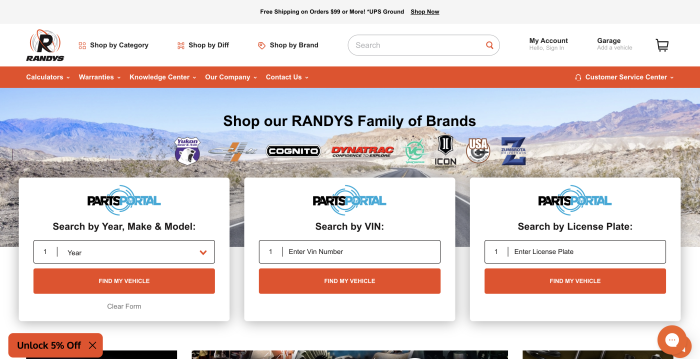
At Core dna we love solving complex challenges. Our B2B eCommerce platform has helped RANDYS Worldwide move their sales operations online and integrate 7 new acquired brands effortlessly.
Challenges:
RANDYS Worldwide is a leader in manufacturing and distributing auto parts.
Most of RANDYS Worldwide business was done on the phone with sales representatives coordinating the right references for the right clients.
This meant a lot of man power was spent on day to day operations instead of focusing on growth potential.
Also as the business grew, RANDYS Started acquiring other brands such as Yukon Gear and Zumbrota. The need for a platform that can help manage all these brands from one central location was mandatory.
Each of the brands that make up RANDYS Worldwide had a unique website and product catalog and customer base.
As you can imagine, managing the sheer volume of platforms was resource-intensive, leading to frustrations, inefficiencies and various inconsistencies.
Solutions Implemented:
RANDYS Worldwide opted to use Core dna’s centralized B2B eCommerce platform. Doing so meant they could manage all seven distinct brands from one platform.
Core dna's multi-site management capabilities and global components allowed RANDYS to create a powerful ecosystem of brands online.
Now RANDYS has one consistent brand experience across all sites. Although managed centrally, each brands has its unique buyers' journeys, products and promotions.
Core dna powers this complex websites and offers flexibility, ease of use and scalability.
- Customized websites for each of the seven brands.
- Integration with ERP and CRM back-end systems.
- Unifying the B2B portal to create smooth customer interactions.
Results Achieved:
- RANDYS worldwide is now running seamless online operations for 7 brands, all managed through one sole platform.
- Customers feedback is very positive as they can now manage all their orders and interactions via their personalized portal.
- Savings were made because the need for multiple eCommerce systems was removed.
- Sales teams are now focused on business development rather than current clients.
- Advanced search was implemented and reduced human interaction as customers could find exactly what they needed.
Randy’s Worldwide was able to scale its operations with minimum effort and deliver a structured, consistent and improved experience for customers of all seven brands.
Solutions to Overcome Potential Challenges with your eCommerce Platform
1. Get an Integration-Ready Platform
It’s a no-brainer. An integration-ready platform like Core dna is designed to connect with your existing systems seamlessly. Your data consistency and operational efficiency will be unaffected. Learn more about Core dna and its integrations here.
2. Run an RFP or RFI
Request for proposal and request for Information are great way to gather information about different vendors. It also give you a comment format for all answers to help you evaluate which is the best eCommerce platform for you.
3. Training and Onboarding
A platform is only good as the person using it. If you implement the best platform in the world but your team can't use it then that is a failed project. Make sure you plan proper training for you eCommerce and marketing teams to give them the best possible odds.
4. Plan for the Future in Terms of Scaling and Budget
Consider your needs today but also your goals. Choosing a B2B eCommerce platform with a flexible architecture will ensure it can grow with your business. Whether it is more traffic or new websites, the platform you choose should accommodate these effortlessly. If your roadmap includes new brands or regions, a multi-store commerce platform lets you launch and manage each storefront from one place.
Conclusion
As b2b and wholesale business transform into digital business, making the right decision when it comes to B2B eCommerce platforms is for the business.
To choose the best B2B eCommerce platform, first assess your business needs. Then, create a detailed RFP. This will help you compare platforms fairly and have a clear sense of all the offerings and features.
One last recommendation from us is do not overlook platform support as it is not only about the software but also the team that will support you using the software.
Have questions? Let our team guide you to the right platform.
Features are one part of choosing well. For the complete picture, see our guide to B2B eCommerce.
Summarize with