
MCP 2.0 is out, and it changes what your AI assistant can do on your Core dna site.
Every business has rules its website should follow. Who gets which enquiry. When a customer is asked for a review. When a sale starts, and when the prices go back.
Until now, your AI assistant could update pages, posts and products. With 2.0 you describe rules like these in plain language, and your assistant builds them into your site as working features: the content they need, the logic, and the automations that run them. When you only want one paragraph changed, that's all it changes.
Below you'll find what you can build, the reporting feature our CTO had Claude build from a single brief, and how 65 tools ended up doing more than 81.
Want to try this for yourself?
What you can build
Most features on a website come down to two things: the information you need to keep, and the rules for what happens to it. On Core dna, that's a new kind of content plus an automation. Describe both, and your AI assistant plans the feature, builds it and runs it so you can check the result.
Two features built entirely through the MCP
On an online store our team is building now, two features that usually need a plugin were built entirely through Core dna MCP. Nobody set anything up by hand in the admin.
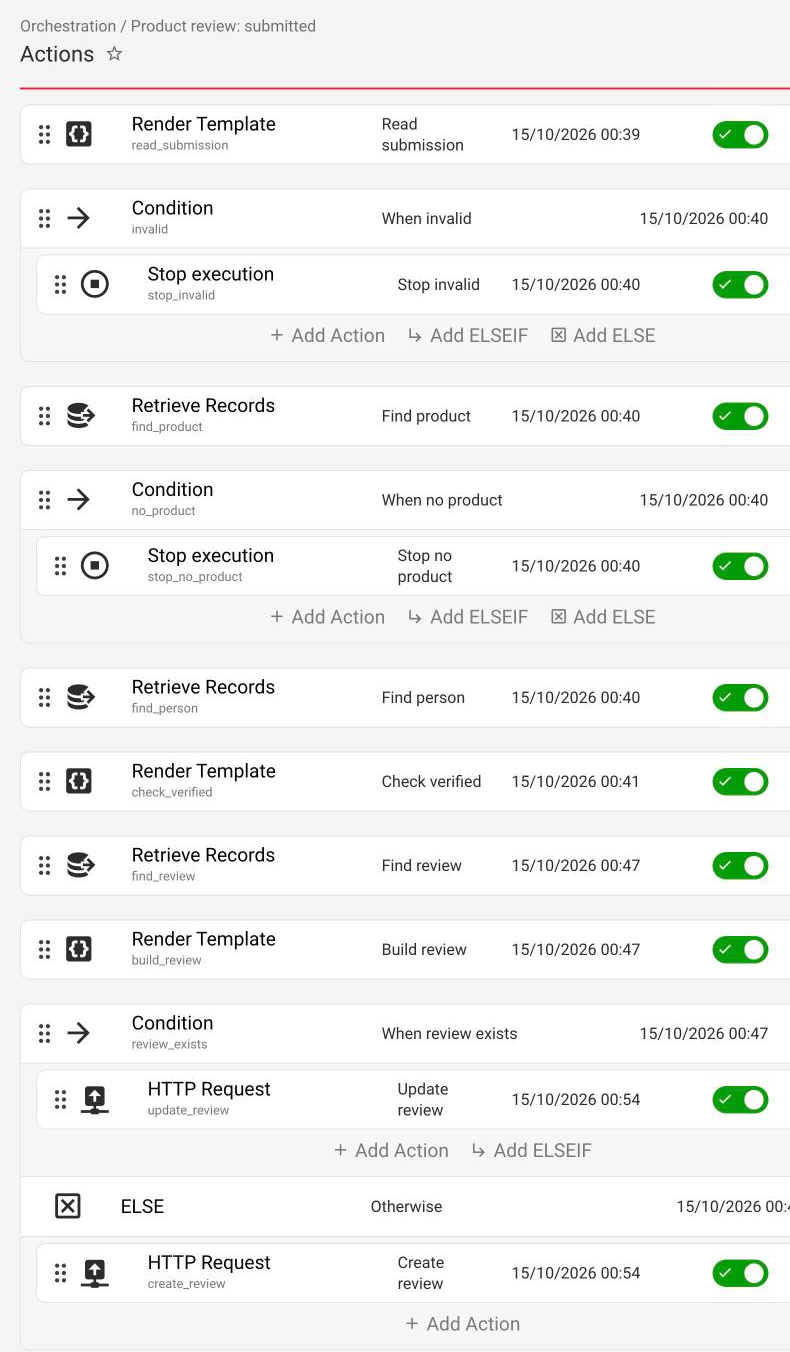
Product reviews
- Every product page has a review form with a 1 to 5 star rating.
- Each review is saved for approval, and it only appears on the site once someone on the team publishes it.
- The automation finds the product, checks whether the reviewer bought it, and updates the product's star rating and review count.
- The customer gets a thank-you email, the store gets an email asking for approval, shoppers can mark a review as helpful, and the store can reply.
Birthday gifts
- Shoppers add their birthday when they sign up, in their account or on the order confirmation.
- Every morning at 9:00, an automation finds that day's birthdays, creates a one-use discount code that lasts 7 days and emails it.
- No one gets more than one gift a year, and every email has a link to stop them.
The assistant wrote every step, and named each one in plain language, so anyone on the team can see what an automation does without reading the logic behind it.
More features teams build the same way
- Back-in-stock alerts. Shoppers ask to be told, and they get an email the moment the product or variant is back.
- Lead routing. Send each enquiry to the sales team for the person's region, and email them a confirmation.
- A timed sale. A landing page and price changes that start on Black Friday and end after Cyber Monday.
- Live form reporting. A private report page for every web form, kept up to date as entries come in. Our CTO built this one, below.
- Locations, events or product guides. Each with its own fields, web addresses and categories.
See everything the Core dna MCP can do, from multi-site rollouts to bulk pricing edits.
What our CTO built from one brief
Here's what building on Core dna looks like at full scale. To test the release, our CTO, Dmitry Kruglov, gave Claude a brief for one of our clients. They collect a lot of emails through web forms, some with more than 300,000 submissions, and had no reporting on any of it.
The brief set out the outcome (a live report page for each form), the approach (one automation checks for new submissions and hands the work to another) and the constraints (no endless loops, big backlogs handled in batches, no two runs writing at once). Claude wrote a plan, Dmitry reviewed it and answered its questions, and then it built, on a development copy of the client's site:
- A new kind of content that stores the report data and shows each report as a page with a private, hard-to-guess address
- An automation with 13 steps that checks each form for new submissions
- A second automation with 26 steps that reads the new submissions and updates the numbers
The screenshots below look technical, and you never need to build or read anything like them yourself. Claude built every step from the brief. You describe what you want in plain language, and the AI builds it for you.
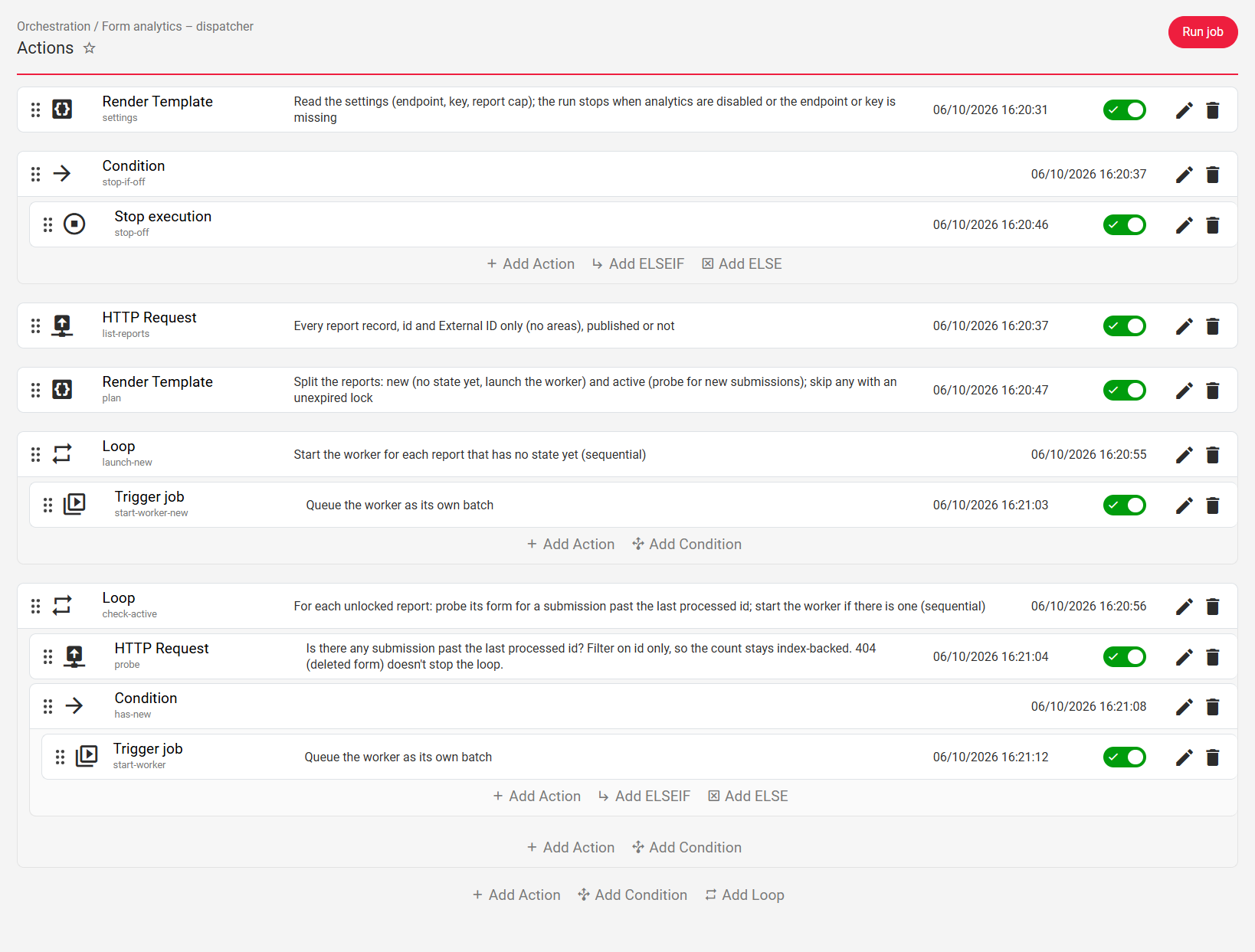
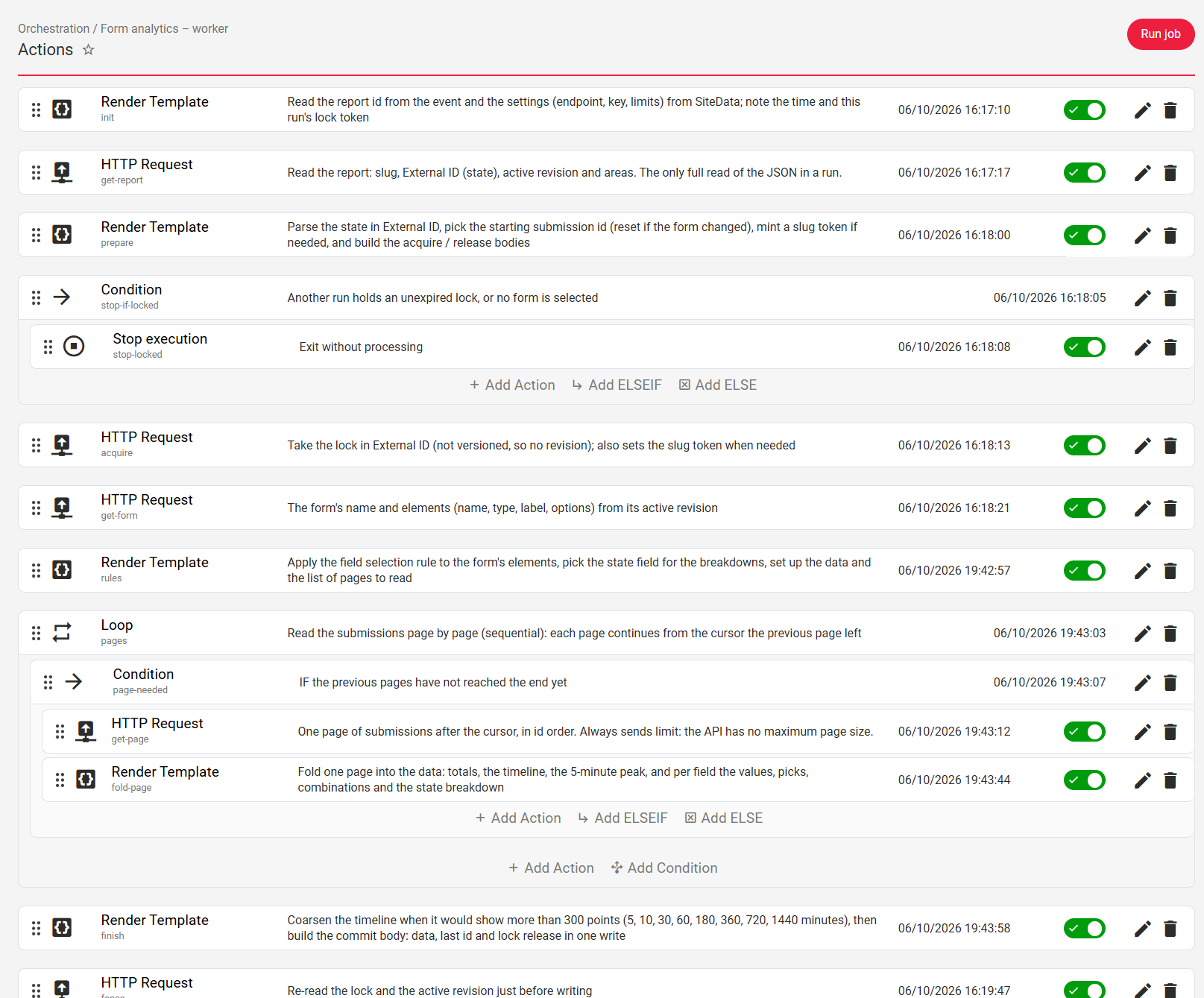
To turn on reporting for a form, someone on the team creates a report and connects it to that form. "Now we can build full-blown apps on Core dna from Claude," Dmitry told the team afterwards.
Before 2.0, a build like this would have been a development project. Now it starts with a brief.
Build the rules by describing them
Automations are the logic behind a feature. Say what should happen and when, and the agent builds it: an email to your sales team every time someone fills in the contact form, a birthday discount code every morning for that day's birthdays, a sale that starts on Black Friday and ends after Cyber Monday. An automation can start from a form, a schedule, a change to any record or a webhook, and it can branch and repeat. One automation can also start another, which is how bigger features like the reporting build above are put together.
If something goes wrong, the agent runs the automation, finds the step that failed, explains it and runs it again. Your team checks the result, the same way you'd review a colleague's work. In the Core dna admin these are called jobs. See how automations and workflows run in Core dna.
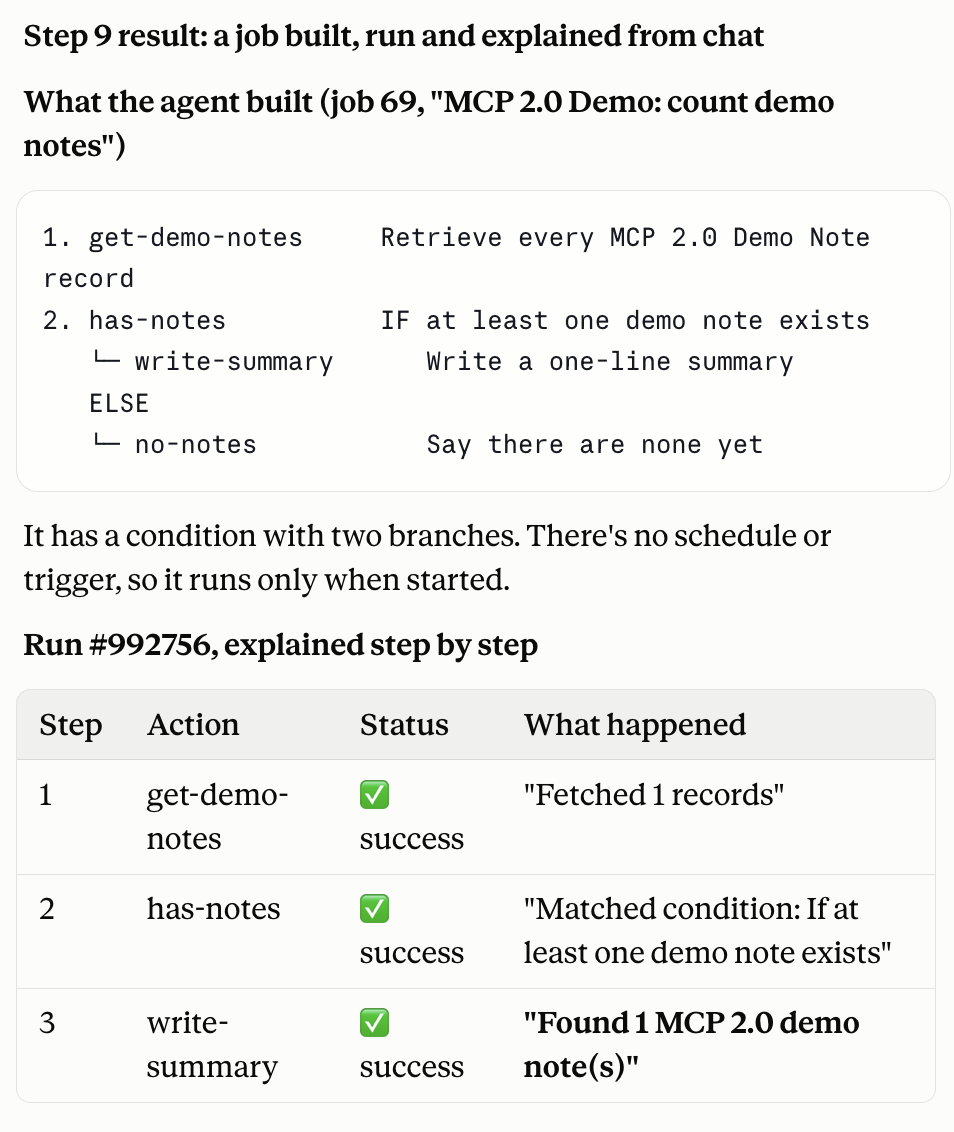
Add the content your feature needs
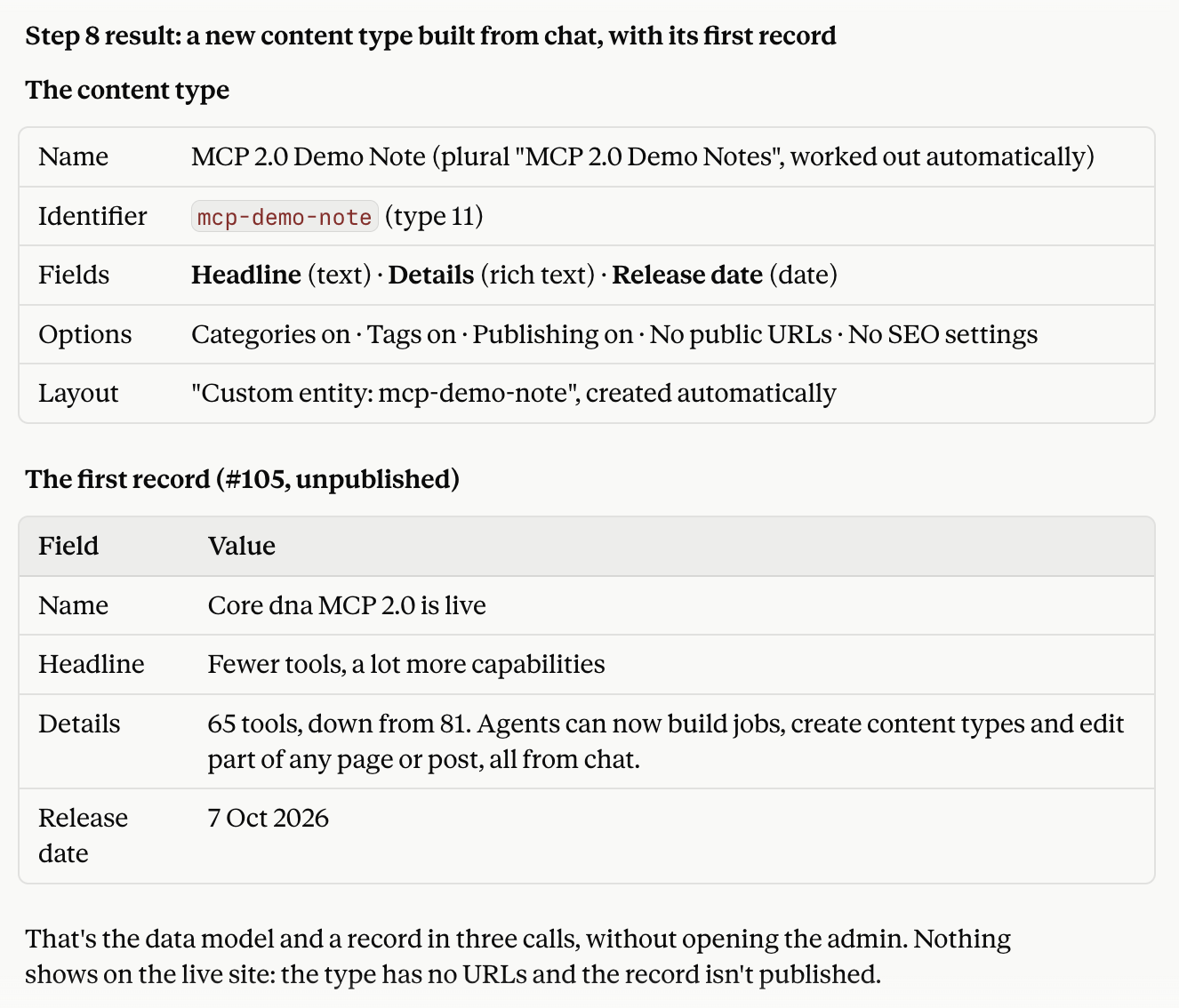
Reviews, events, case studies, product guides, store locations. Describe the content you need and the agent sets it up with the fields, web addresses, categories, tags and publishing options to match, then adds the first entries as drafts.
Put a new kind of content together with an automation and you have a working feature, built in one conversation. That's how the reporting feature above was made.
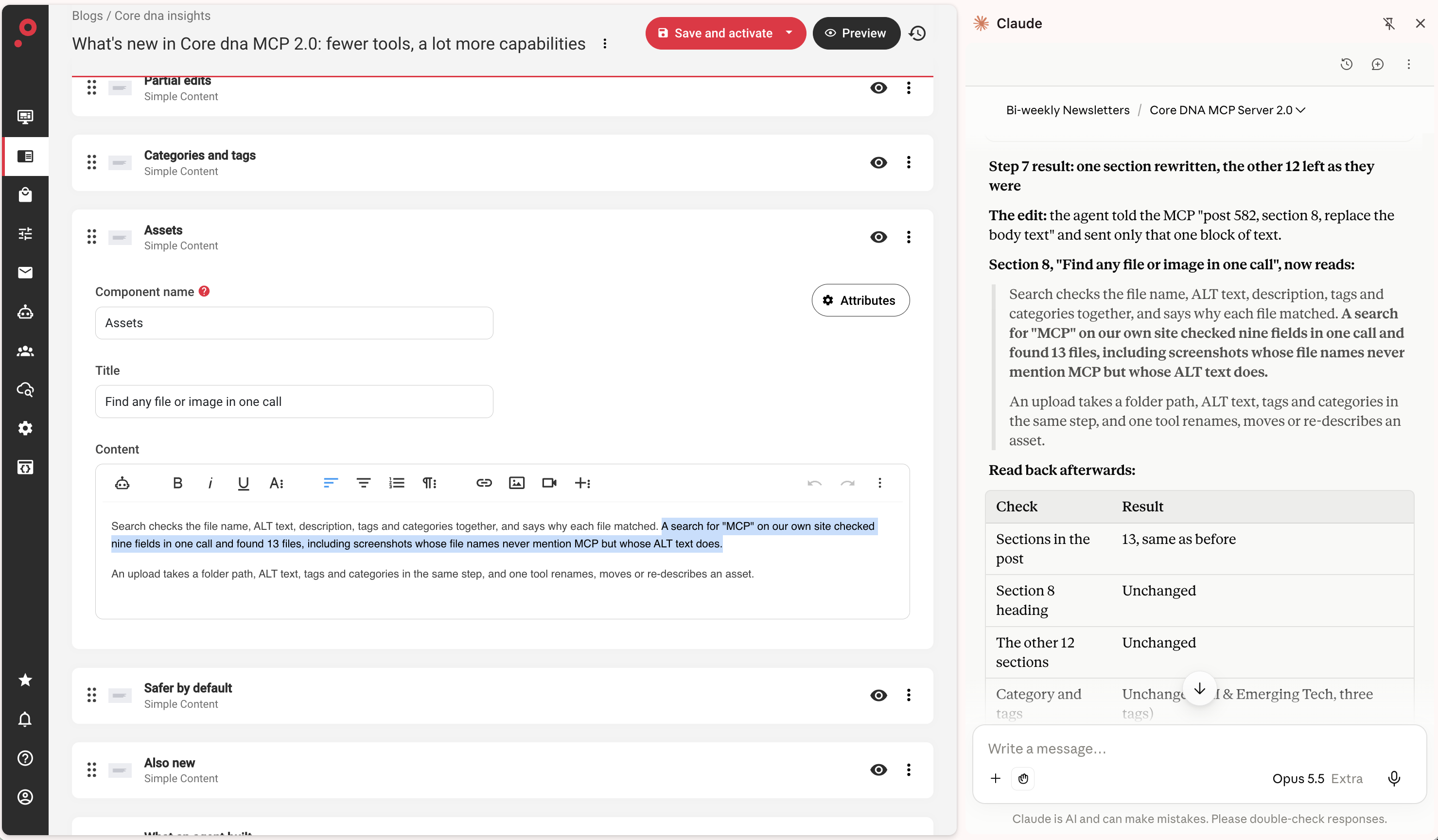
Change one part of a page
Ask for one paragraph to change and only that paragraph changes. Everything else on the page, post or FAQ stays exactly as it was, and the previous version is kept, so every change is easy to check and easy to undo.
You stay in control
- Automations start switched off. A new automation does nothing until you switch it on.
- New content starts as a draft. Entries the agent adds stay unpublished until you publish them.
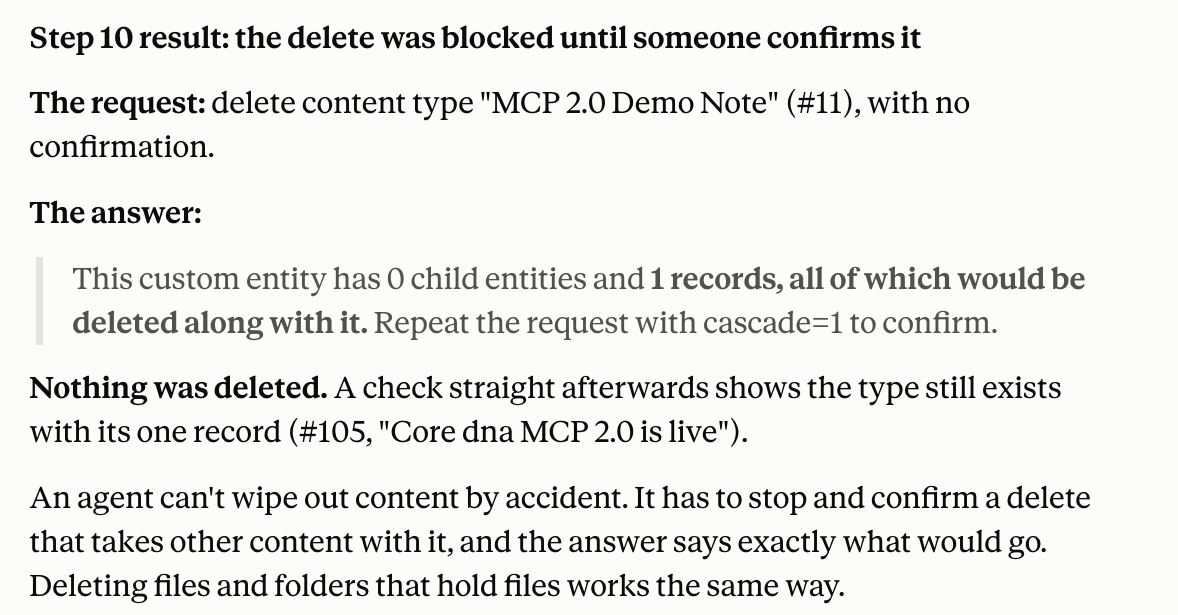
- Deletes need your OK. If removing something would take other content with it, the agent has to confirm first, and it tells you exactly what would go.
- No passwords. The MCP never sets passwords. New users set their own.
- Safe uploads. Files can only be added from public, secure web addresses.
- Hidden credentials. Keys and passwords inside automations are masked.
Why fewer tools do more
A lot of MCP servers turn every part of their API into its own tool. The AI then has to chain small steps together to finish one task: looking things up, recovering from errors and trying again. That gets harder with every step a feature needs.
We rebuilt Core dna MCP around the tasks people actually ask for. Each tool now finishes a whole task, even when that takes several steps behind the scenes. "A good MCP server is like a separate program," says Dmitry. "It doesn't have to replicate everything your website has."
That's how 81 tools became 65. Fewer, clearer tools mean your assistant picks the right one first time, and answers carry about 30% less data, which leaves more room in the conversation for the feature you're building. Anthropic's guide to writing effective tools for agents makes the same case.
Also improved
Smaller changes that add up when you work on your site from chat:
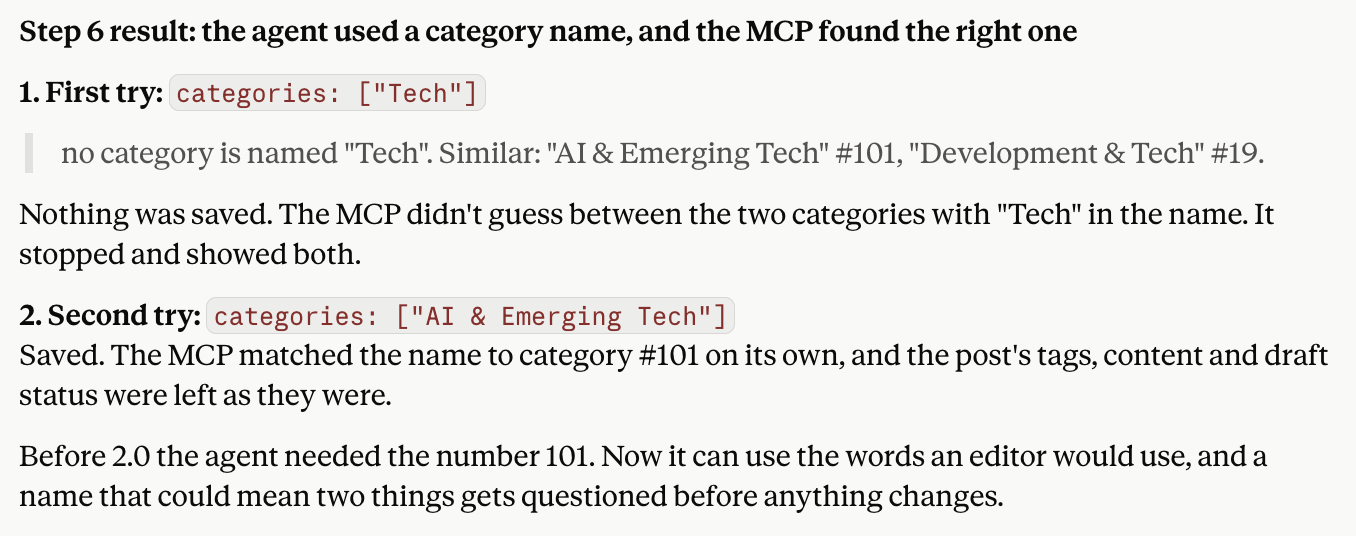
- Tag by name. Say "tag this as Product News" and it's done. If two tags sound alike, the agent asks which one you mean.
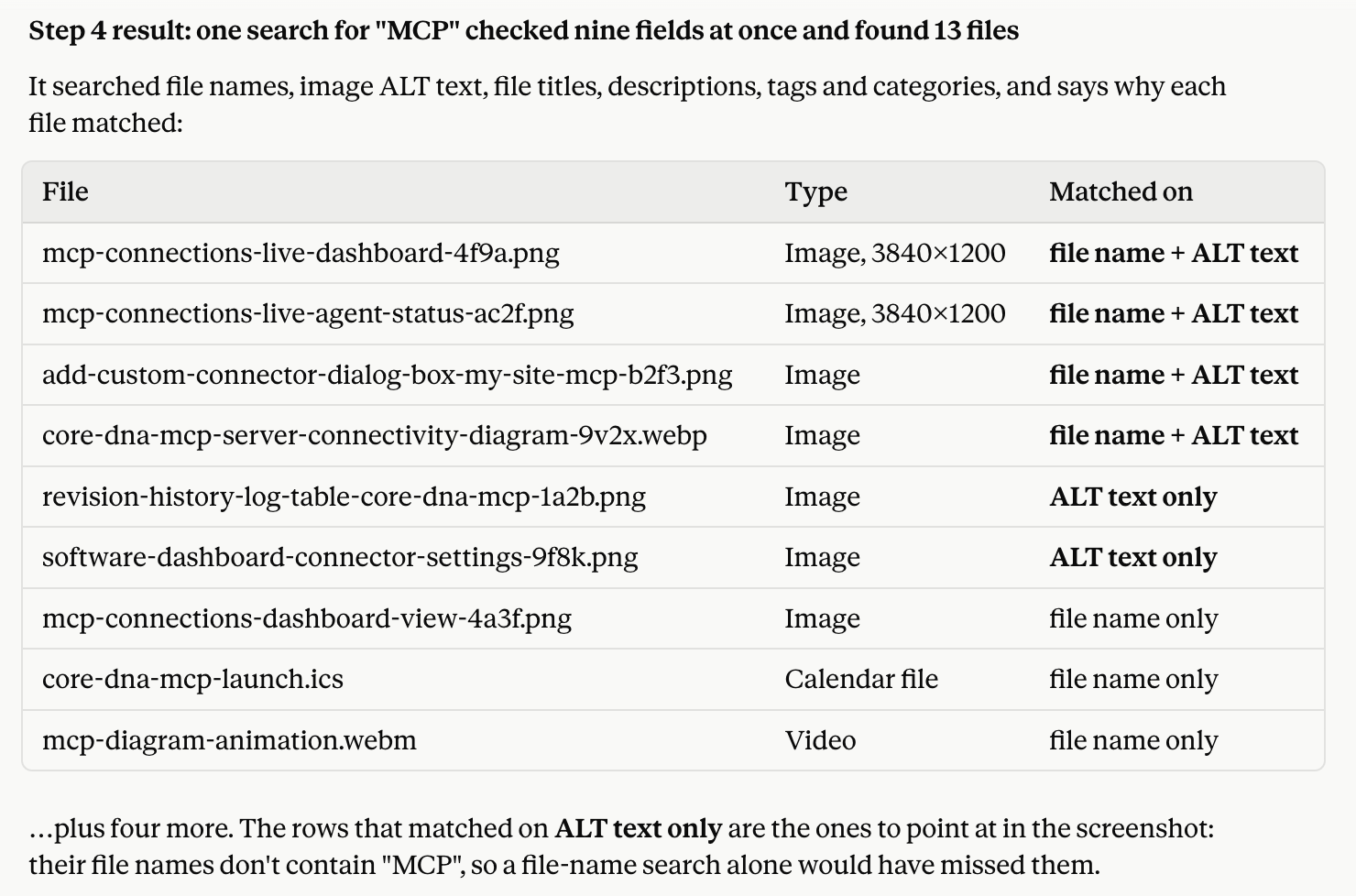
- Find any image or file. Search by name, ALT text, description or tag, and see why each one matched.
- Find a page from its web address.
- See your full menus, with the page behind every link.
- Read forms and their entries by field name.
- Every site and language in your account in one view, so the agent works on the right one.
- Clearer messages when something can't be done, so the agent can correct course without guessing.
Start with these prompts
Try these in Claude or ChatGPT with your Core dna site connected. Swap in your own products, pages and forms.
Build a feature
- "Build us a review system. Ask customers for a review a week after their order, let us approve each one, and show star ratings."
- "When someone fills in our contact form, send it to the sales team for their region and email them a confirmation."
- "Create a landing page featuring our diamond rings at 25% off. Launch it on Black Friday and restore regular prices after Cyber Monday."
- "Set up a Case Studies section with client, industry and results fields, then add our first one as a draft."
Quick edits
- "Rewrite the intro on our About page so it's shorter, and show me the new version before you save it."
- "Tag our 10 latest blog posts by topic. If a tag isn't clear, ask me first."
Connect your site to MCP 2.0
MCP 2.0 is live for Core dna customers now, and we can't wait to see what you build with it. It works with Claude, ChatGPT and other AI tools that support the Model Context Protocol.
Read how to connect Core dna to AI agents, or see 10 multi-property workflows teams run on Core dna MCP. For the thinking behind the design, read why we built an MCP server for marketers, not developers.
Try MCP 2.0 on your own Core dna site.
Summarize with